Kategorie: Allgemein
-
A few DAX functions
Ursprünglich veröffentlicht auf Data and AI: This query shows summarise, addcolumns, filter, union, row and format DAX functions: UNION ( ADDCOLUMNS ( SUMMARIZE ( FILTER ( financials, financials[Product] = „Montana“ ), financials[Country] ), „Sales“, FORMAT(CALCULATE(SUM(financials[ Sales])), „#,###“) ), ROW(„Total“, „Total“, „Sales“, FORMAT(SUM(financials[ Sales]), „#,###“)) ) The financials table is filtered on Product = Montana Display…
-
Manage CDS Entity Data – Microsoft PowerApps Office Add-In — Bansal Blogs – Dynamics 365, PowerApps, Microsoft Flows, Power BI
Microsoft PowerApps Office Add-In enables user to read, modify and insert data in CDS environment. Add-In is available for download here for free, or you will be prompted to install Add-In for first time when you open entity data in excel from PowerApps portal. Add-In establishes connection to PowerApps OData service. Note: Add-In is compatible […]…
-
Calling The Power BI REST API From Microsoft Flow, Part 3: Finding All Data Sources Used In A Power BI Tenant
Chris Webb's BI Blog [Part 1 of this series can be found here and part 2 here] The problem with self-service BI is that you never quite know what your users are up to. For example, what data sources are they using? Are there hundreds of Excel files being used as data sources for reports…
-
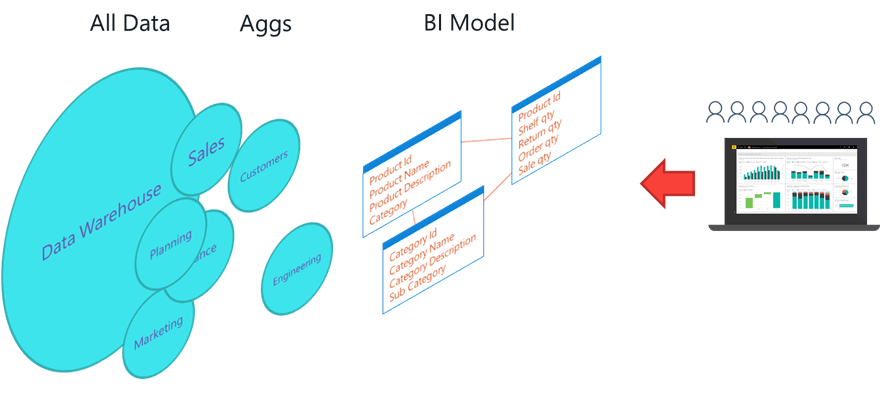
Keeping Big Data Big with Aggregations
Ursprünglich veröffentlicht auf PhantomDB: I have built several solutions over the years to enable business users to get at the data they need to do the analysis that is important to them. I would build cubes so that they could slice, dice and mold the data into the shape they need. They would use tools…
-
Power BI Dataflows
Die vielen Neuerungen in Power BI sind ja für mich kaum noch alle nachzuverfolgen. Darum versuche ich, die Informationen zu filtern. Dataflows sind mir schon seit einiger Zeit im Hinterkopf hängen geblieben, da es hier mehr um Design als um Visualisierung geht. Eine wirklich erschöpfende und trotzdem flüssig zu lesende Abhandlung dieses Themas gibt es…
-
Microsoft Flow – Business process flows from a traditional Flow perspective
SharePains Recently Microsoft added Business process flows to their Microsoft Flow platform. If you thought that this was just like Flow then you will very quickly find out that it is not. A bit of background first As part of Dynamics 365 there is the Process Center. Within the Process Center you can maintain processes…
-

Dynamics 365 Business central on-premise: why I can’t find my C/AL page on Search?
Ursprünglich veröffentlicht auf Stefano Demiliani: This seems to be a problem for many partners and developers that have start working with Dynamics 365 Business Central on-premise in these days and this is not actually well documented in my opinion. I think that you already know that when developing a page with the AL language extension…
-
Ignite 2018 – Book of News with all announcements — workingondata
Last week was Ignite 2018 time. A week full of announcements from all Microsoft product groups. Twitter and other social media channels were full of messages mentioning the news. For me – as a non-attendee – it was fun to read through the news flood – but hard to find a summary of all the […]…
-
Microsoft Analysis Services Part 1: The Tabular Model and Why You Need It!
I really enjoyed watching this video. Why? I love the concept of Self Service BI. But you need to have business critical data maintained at one single place (Single Source of Truth). Microsoft Analysis Services Part 1: The Tabular Model and Why You Need It!
-
Using Power Query And Microsoft Flow To Automate The Creation Of CSV Files — Chris Webb’s BI Blog
I was super-excited when, a few days ago, the long-awaited integration of Power Query into Microsoft Flow was announced. I was then gutted when work commitments meant I couldn’t blog about it right away and Erik Svensen beat me to it with this excellent post showing how to push data from SQL Server via Power […]…
 ERP and BI